How to show an estimated delivery date on Shopify without an app
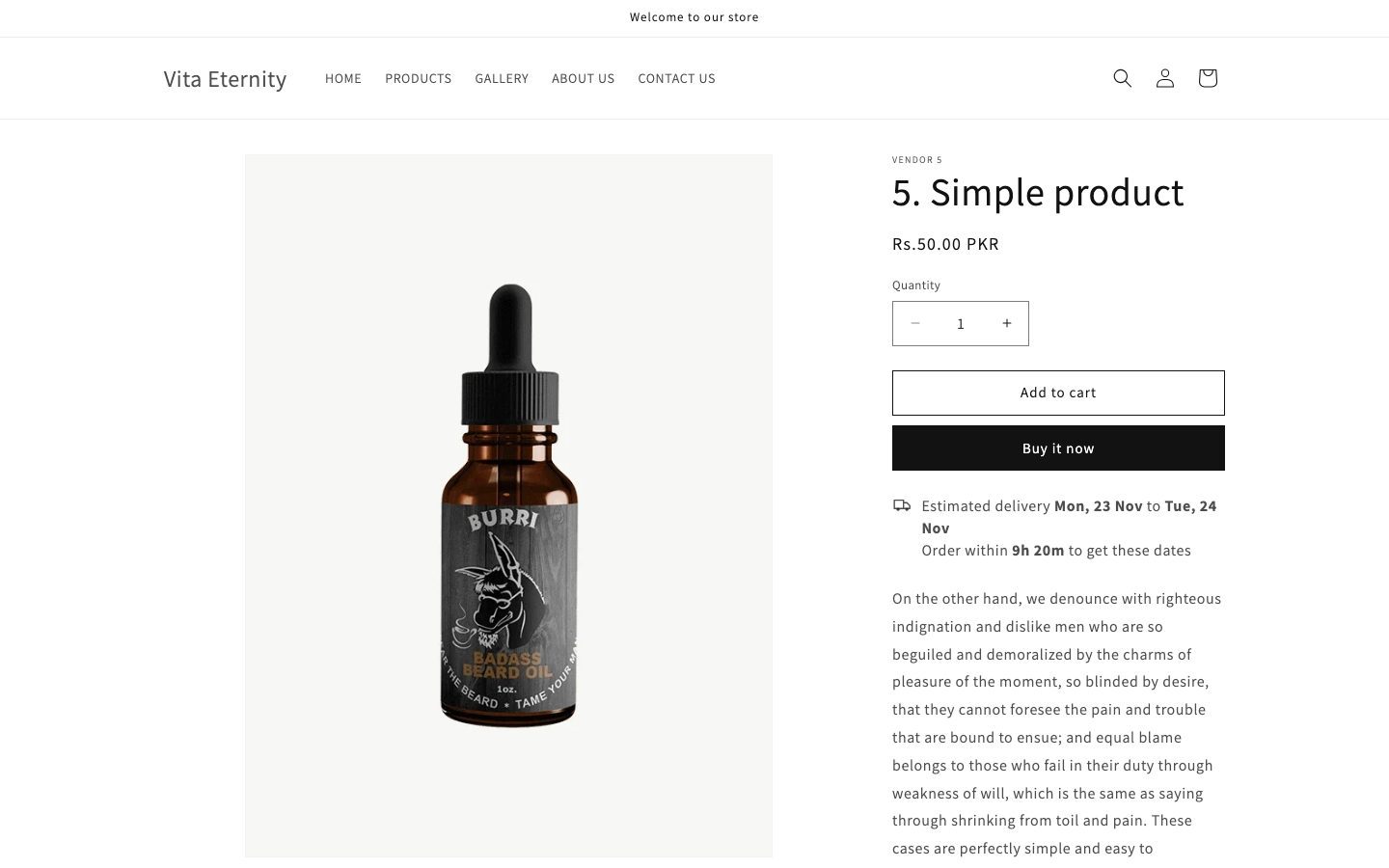
Add a Liquid section to your theme. It reads your cutoff time, shipping days, carrier days and holidays, works out the date in the shopper's browser, and prints it under the buy button, on the cart page and in the cart drawer.
- Shows on
- Product page, cart page, cart drawer
- Themes
- Dawn and Horizon
- Install
- About 15 minutes, copy and paste
- Price
- $29 once, one store, 30-day refund
- Script
- Under 5 KB, no outside requests to load it
Shopify's own delivery dates cover checkout for free, but the product page needs theme code or an app. This guide uses a ready-made section for Dawn and Horizon that costs $29 once.
What Shopify already gives you
Check this first. It's free.
In Settings > Shipping and delivery > Estimated delivery dates, Shopify can show a date range at checkout. Manual mode adds your fulfillment time to the carrier's transit time, counts Monday to Friday as business days, and uses a fixed 12 pm cutoff in the shipping origin's time zone. Automated mode predicts dates from your fulfillment history. It needs the Basic plan or higher, at least one fulfilled domestic order, and a location in an eligible country (US, Canada, Australia, New Zealand, the UK and much of Europe).
Two gaps. Both modes are built for checkout, and the only product page text Shopify documents is a Christmas delivery message in automated mode. So if you want "Estimated delivery Sat 28 Nov to Wed 2 Dec" under the buy button, with your own cutoff, you need theme code. Keep Shopify's checkout dates switched on too. They work fine side by side.
Source: Shopify Help Center, "Setting up manual delivery dates" and "Setting up automated delivery dates", read 22 Nov 2026.
How the date is worked out
- Order day. Today, if today is a shipping day and the clock is before your cutoff. Otherwise the next shipping day.
- Ship day. The order day plus "Days to prepare the order", counting shipping days only. 0 means it ships the day it counts as ordered.
- Arrival. Between "Fastest" and "Slowest" delivery days after it ships, counting only days your carriers deliver.
Holidays are skipped for shipping and delivery. All times use your store's time zone, wherever the shopper is. The date is worked out again on every visit, so it never goes stale, and day and month names follow the language the shopper is browsing your store in.
Example. It's Wednesday 25 November 2026, 10:00. Cutoff 14:00, 1 day to prepare, delivery 2 to 5 days, you ship Monday to Friday and carriers deliver Monday to Saturday. The estimate reads Saturday 28 November to Wednesday 2 December, with "Order within 4h 0m". At 14:00 it moves to Monday 30 November to Thursday 3 December.
Install it, step by step
-
Add the files
Open Online Store > … > Edit code.
- Right-click
sections> New file, name itdelivery-date-rules.liquid, paste in the file of the same name from the zip, save. Do the same fordelivery-date-cart.liquid. - In
snippets, do the same fordelivery-date.liquid,delivery-date-match.liquidanddelivery-date-script.liquid. - Horizon only: in
blocks, do the same fordelivery-date.liquid.
- Right-click
-
Enter your rules (once, for the whole store)
- Click Customize. In the sidebar, under Header, click Add section and pick Delivery date rules.
- Drag it to the top of the Header group, above the announcement bar and the header. It takes no space on the page. (On Horizon, a section below the header can change how a transparent header lines up. The editor shows a warning if it's in the wrong place.)
- Fill in your time zone, cutoff time, shipping days, carrier days and holidays.
- Open the Delivery rule block inside it and set the days. Add one rule per delivery time, up to 50.
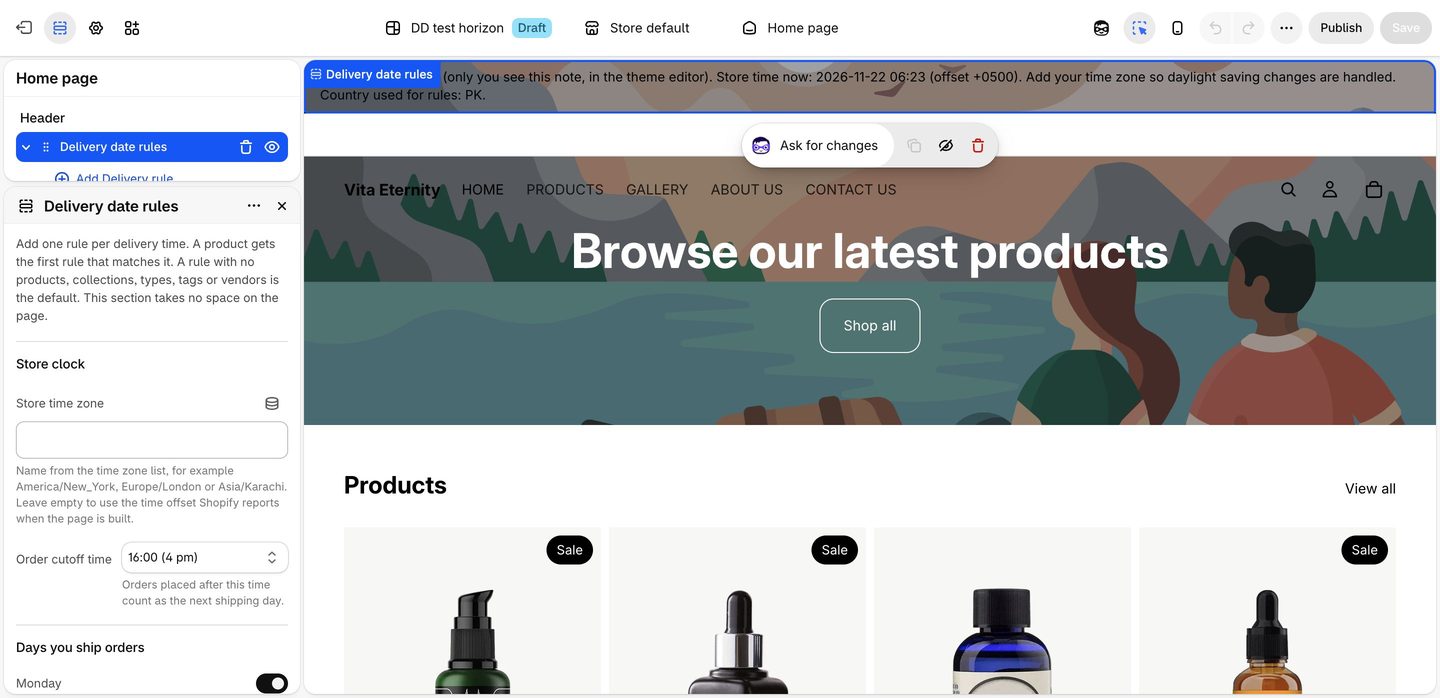
The Delivery date rules section in the Header group. -
Show it on the product page
Horizon: switch the template to Products > Default product. Open Product information > Product details > Add block > Delivery date. Drag it under the buy buttons.
Dawn: in Product information, click Add block > Custom liquid, paste this line, then drag the block under Buy buttons:
{% render 'delivery-date' %}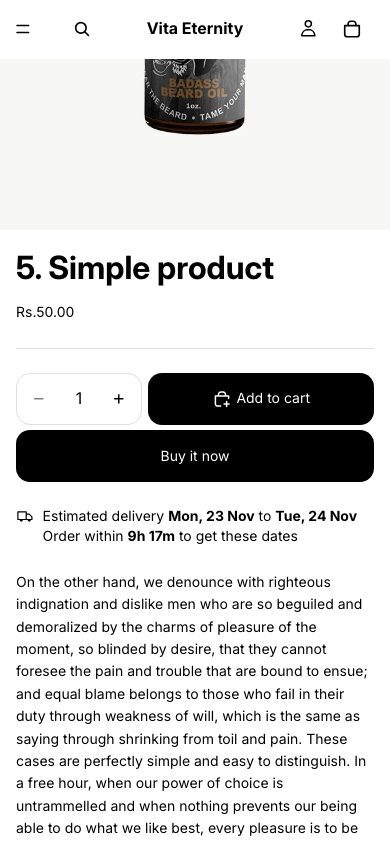
Horizon on a phone. -
Show it on the cart page
Switch the template to Cart, click Add section and pick Delivery date: cart. On Horizon you can add the Delivery date block inside the Cart section instead.
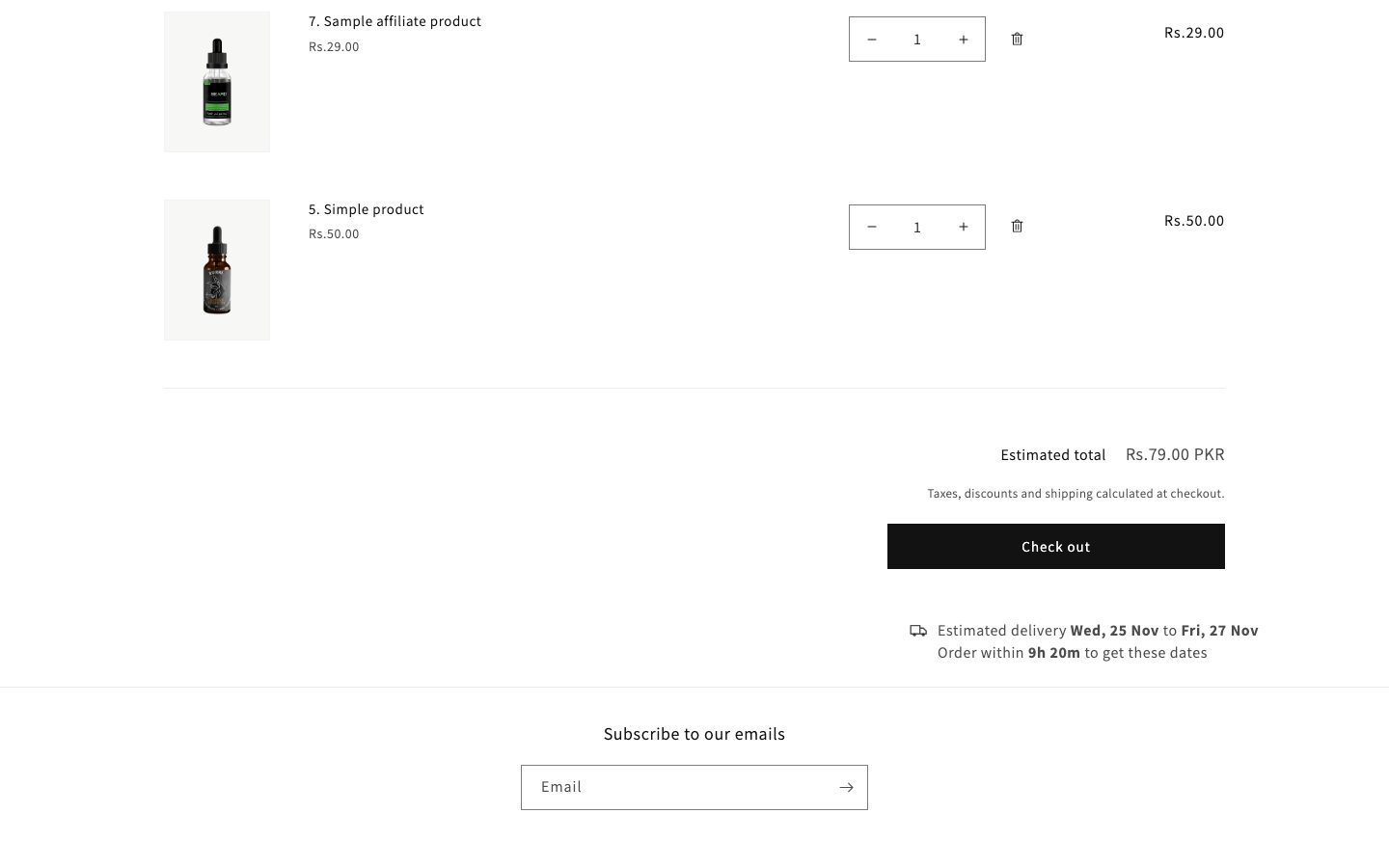
One estimate for the whole cart, under the total. -
Cart drawer (optional, one line)
In Edit code, open
snippets/cart-drawer.liquid. Search (Ctrl+F or Cmd+F) for the text below and paste this line on the line above it:{% render 'delivery-date', show: 'cart' %}- Dawn: above
<div class="cart__ctas" - Horizon: above
{% render 'cart-summary', section_id: 'cart-drawer-section' %}
A theme update replaces this file, so paste the line again after you update the theme.
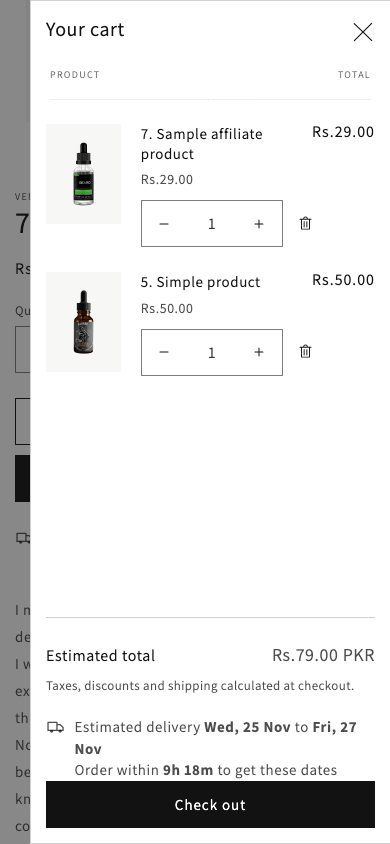
The cart drawer, after the one-line paste. - Dawn: above
Every setting explained
Delivery date rules section (Header group)
| Setting | Default | What it does |
|---|---|---|
| Store time zone | Empty | A name from the time zone list, like America/New_York or Europe/London. Empty uses the time offset Shopify reports when the page is built. Fill it in so daylight saving changes are handled. |
| Order cutoff time | 14:00 | Orders after this count as the next shipping day. Half-hour steps, or none. |
| Days you ship orders | Mon to Fri | Tick each weekday you hand parcels to the carrier. |
| Days your carriers deliver | Mon to Sat | Tick each weekday a parcel can arrive. |
| Holidays | Empty | No shipping and no delivery. One per line: 2026-12-25 for one year, 12-25 for every year. |
| Estimate text | Estimated delivery {start} to {end} | {start} is the earliest date, {end} the latest. |
| Text when both dates are the same | Estimated delivery {start} | Used when fastest and slowest land on one day. |
| Date format | Short | Four choices. The order of day and month follows the shopper's language. |
| Show countdown to the cutoff | On | Shows only before the cutoff on a shipping day. Updates once a minute. |
| Countdown text | Order within {countdown} to get these dates | {countdown} becomes the time left, like 3h 12m. |
| Hide on sold out products | On | No estimate when the product can't be bought. |
| Style | Plain | Plain text or a box. |
| Show truck icon | On | A small outline truck before the text. |
| Text size | Normal | Normal or small. |
Delivery rule block (up to 50)
| Setting | Default | What it does |
|---|---|---|
| Rule name | Standard delivery | Only you see it. |
| Days to prepare the order | 1 | Shipping days before the order leaves, 0 to 30. |
| Fastest delivery | 2 | Delivery days after it ships, 0 to 60. |
| Slowest delivery | 5 | Delivery days after it ships, 0 to 60. |
| Only for these countries | Empty | Two-letter codes, like US, CA. Empty means every country. |
| Products, Collections | Empty | Pick products, or collections they belong to. |
| Product types, Tags, Vendors | Empty | Comma-separated, like made-to-order. Capital letters don't matter. |
Delivery date: cart section
Position (start, center, or end under the total), space above and space below. Everything else comes from the rules section.
Which rule a product gets
- A rule with no products, collections, types, tags or vendors is the default. It covers every product nothing else matched.
- A rule that matches the product beats a default rule. If two rules match, the higher one wins, so put specific rules above general ones.
- A country list limits a rule to shoppers from those countries. The country is the one Shopify has set for the visit, the same one used for currency and the country selector.
- If no rule fits the shopper's country, no estimate shows. Use this to stay quiet in countries you don't quote.
The cart estimate
The cart shows one estimate: the latest dates across all items. Gift cards and other items that need no shipping are left out. If any item has no rule for the shopper's country, the cart estimate hides rather than show a date that could be wrong. A default rule avoids this. When the shopper changes the cart, the estimate updates by itself.
In the theme editor, a note at the top of the page shows the store time the estimate uses, the rule for the product you're viewing, and any cart items with no rule. Shoppers never see it.
What it can't do
- No checkout display. Theme code can't touch checkout. Use Shopify's own delivery dates there.
- Not in quick add popups or featured product sections. Only the product's own page, the cart page and the cart drawer.
- No postcode or ZIP rules. Rules go down to country, no further.
- Rules match products, not variants. Every variant of a product gets the same estimate.
- Dawn and Horizon only. Other themes aren't supported.
- The cart drawer line needs pasting again after a theme update.
Need any of those? An app is the better buy. The app vs section comparison has prices.
FAQ
Can Shopify show an estimated delivery date without an app?
At checkout, yes: Settings > Shipping and delivery. On the product page and cart you need theme code, like this section.
Does it show the date at checkout?
No. A theme section can't change checkout. Shopify's own delivery dates or an app can.
Which themes does it work with?
Dawn and Horizon. Using something else? Email m.fahadiqbalofficial@gmail.com with the theme name before you buy.
Will it slow my store down?
It loads no outside script and no library. The date script is under 5 KB and ships inside the section. After a cart change it makes one request to Shopify to refresh the cart estimate.
Can different products have different delivery times?
Yes. Up to 50 rules, matched by product, collection, product type, tag, vendor or country. The first match wins.
How are weekends and holidays handled?
Tick the days you ship and the days carriers deliver. Listed holidays are skipped for both. 12-25 repeats every year.
Can I change the wording?
Yes, in the theme editor. Use {start}, {end} and {countdown} where you want the dates and the time left.
How do I remove it?
Delete the Delivery date rules section, the Delivery date: cart section and any Delivery date blocks in the theme editor. Remove the cart drawer line if you added it. Then delete the files.
Estimated Delivery Date for Shopify
6 Liquid files and a PDF install guide. Dawn and Horizon. One store per licence, including its development and duplicate themes. Agencies buy one per client store.
$29 once. 30-day refund.
Questions first? m.fahadiqbalofficial@gmail.com